Transforming a cluttered cancer support centre’s website into a clear, empathetic guide
Transforming a cluttered cancer support centre’s website into a clear, empathetic guide
Overview
HopeSpring, a nonprofit cancer support centre, offers free programs and resources to people living with cancer and their families. But its 58-page website was cluttered and confusing, especially difficult for survivors already coping with “cancer brain fog.”
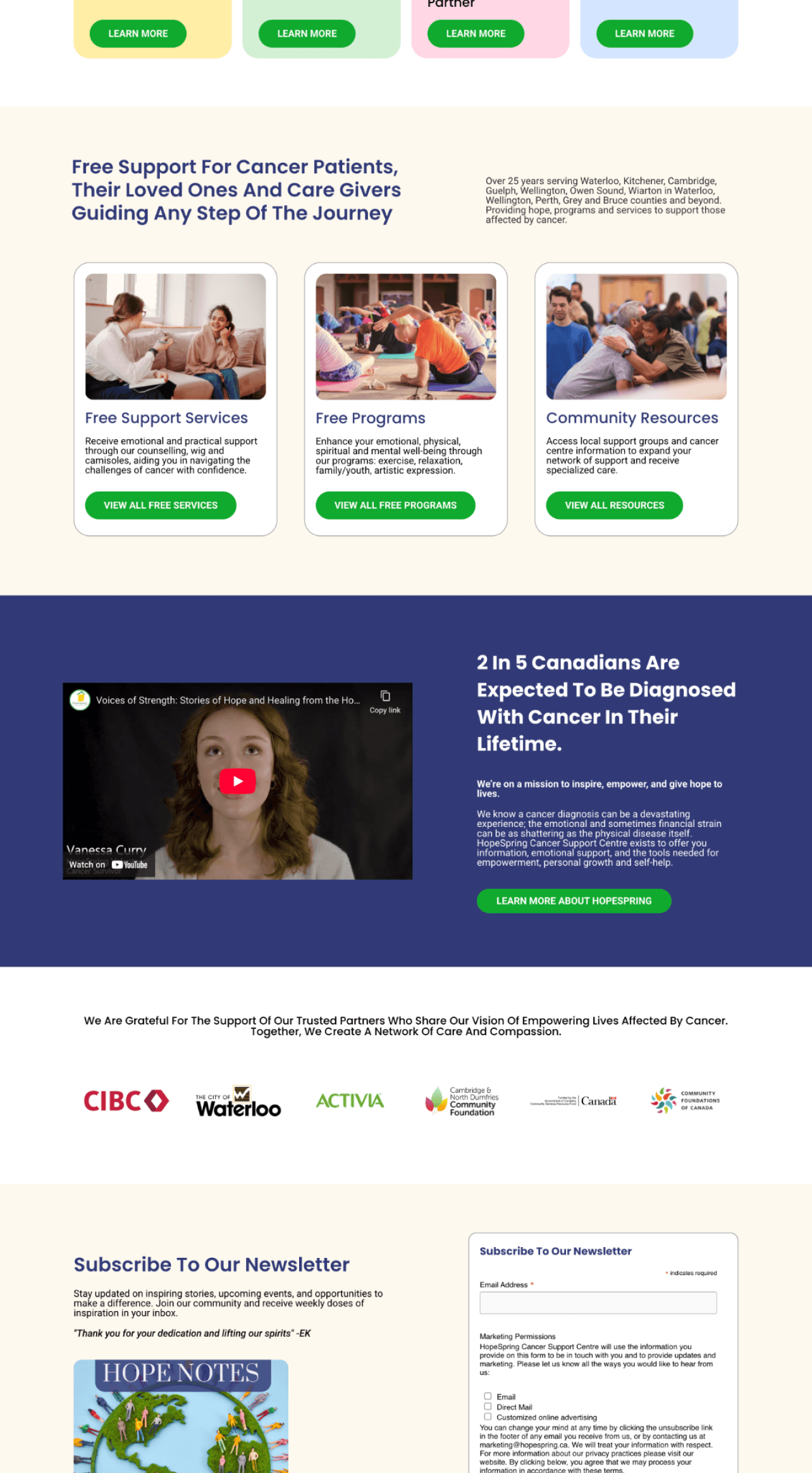
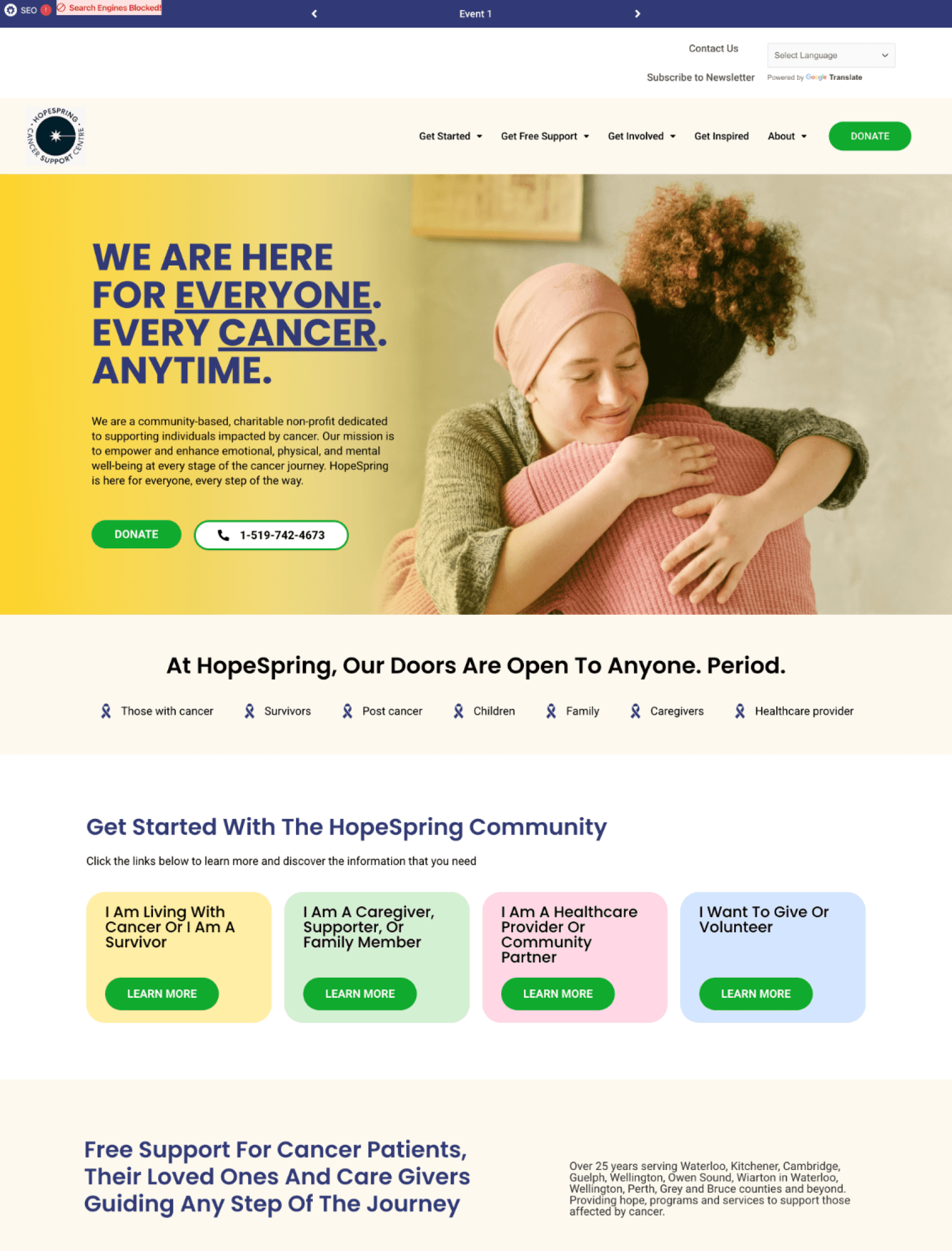
I redesigned the site into a calmer, more empathetic experience by cutting pages in half, simplifying menus, adding clear donation flows, and tailoring entry points for survivors, caregivers, donors, and providers. The result: a digital space that guides users with clarity and compassion, reflecting HopeSpring’s mission of care.
HopeSpring, a nonprofit cancer support centre, offers free programs and resources to people living with cancer and their families. But its 58-page website was cluttered and confusing, especially difficult for survivors already coping with “cancer brain fog.”
I redesigned the site into a calmer, more empathetic experience by cutting pages in half, simplifying menus, adding clear donation flows, and tailoring entry points for survivors, caregivers, donors, and providers. The result: a digital space that guides users with clarity and compassion, reflecting HopeSpring’s mission of care.
Contribution
UX/UI
Research
Ideation
User flows
Branding
Prototyping
Team
Nancy Zheng
Nancy Zheng
Duration
May 2023 - Present
May 2023 - Present
Project type
Internship
Internship
The problem
The site wasn’t just inconvenient; it was overwhelming
The site wasn’t just inconvenient; it was overwhelming
HopeSpring is a nonprofit cancer support centre that provides free programs, counselling, and resources to people living with cancer and their families. But their digital presence wasn’t aligned with their mission:
HopeSpring is a nonprofit cancer support centre that provides free programs, counselling, and resources to people living with cancer and their families. But their digital presence wasn’t aligned with their mission:
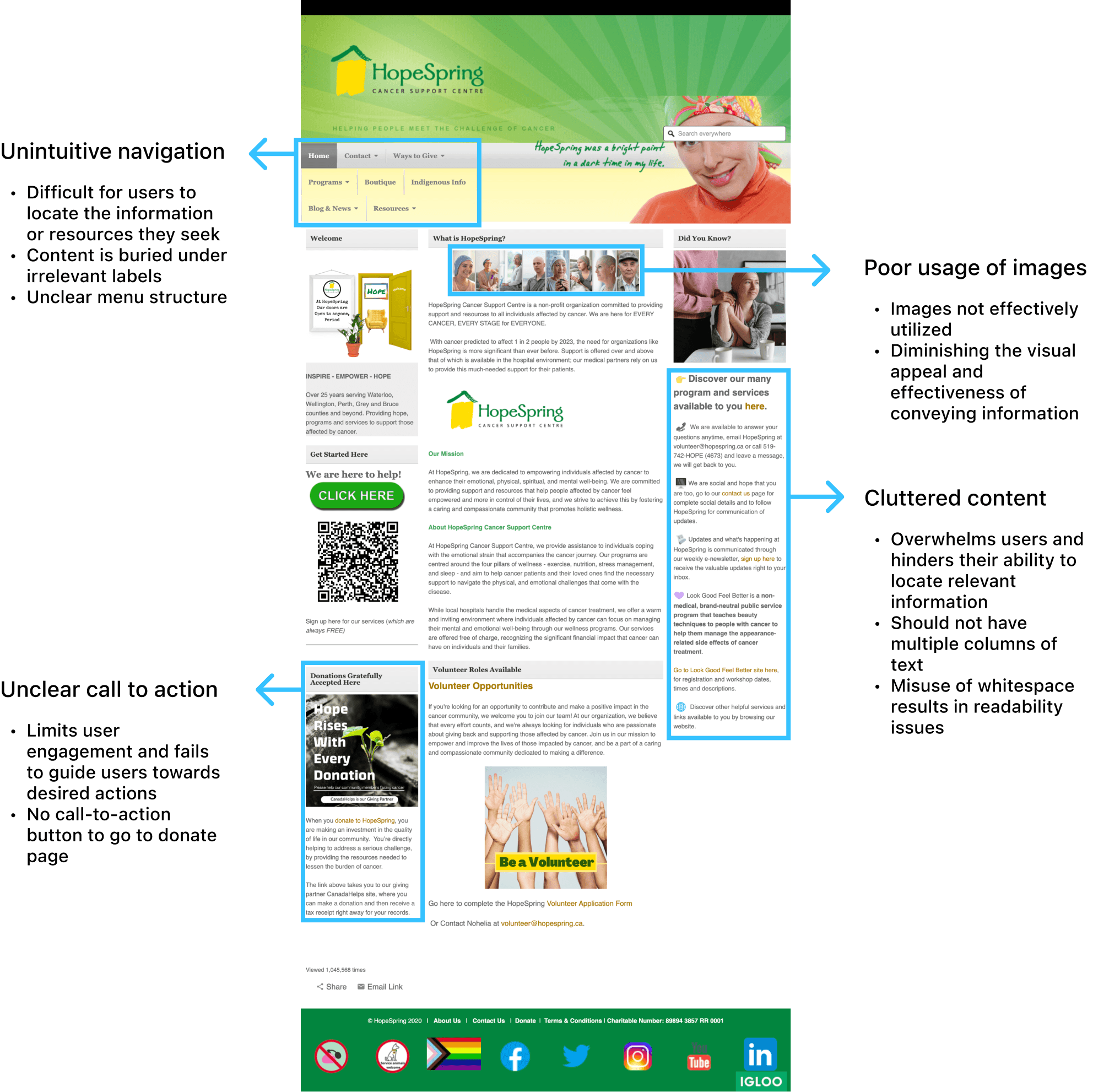
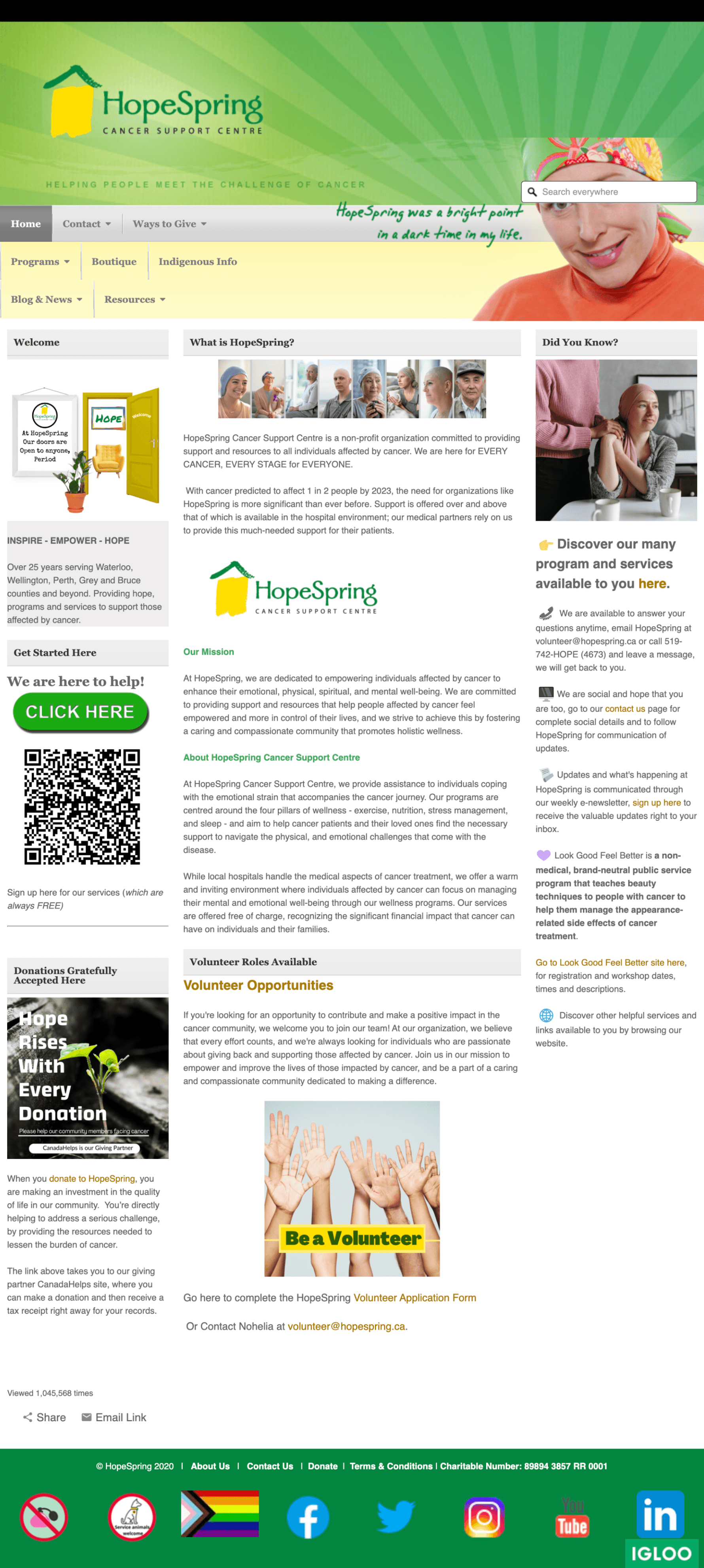
Unintuitive navigation
Difficult for users to locate the information or resources they seek
Content is buried under irrelevant labels
Unclear menu structure
Unclear call to action
Limits user engagement and fails to guide users towards desired actions
No call-to-action button to go to donate page
Poor usage of images
Images not effectively utilized
Diminishing the visual appeal and effectiveness of conveying information
Cluttered content
Overwhelms users and hinders their ability to locate relevant information
Should not have multiple columns of text
Misuse of whitespace results in readability issues
However, I faced three major hurdles:
However, I faced three major hurdles:
I was the only designer
I was the only designer
I had to build everything from scratch
I had to build everything from scratch
There were no past data to guide decisions
There were no past data to guide decisions
This meant every decision had to be grounded in user interviews and empathy, not pre-existing metrics.
This meant every decision had to be grounded in user interviews and empathy, not pre-existing metrics.
The solution
A website redesign to transform and guide user frustrations into seamless support experiences.
A website redesign to transform and guide user frustrations into seamless support experiences.
Research analysis
4 distinct user groups
Through 10+ interviews with survivors, caregivers, healthcare providers, volunteers, and donors, I uncovered four key groups, each with distinct needs:
Individuals with cancer or cancer survivor
“I can’t find where to book a program.”
Cancer survivor
Caregiver, supporter, family member
“It’s too hard to find what I need.”
Caregiver
Volunteers and donors
“I’d love to donate, but there’s no obvious button.”
Donor
Healthcare providers and community partners
“I want to share resources with my patients, but I can’t locate them.”
Healthcare provider
Despite different goals, they all echoed the same frustration:
Despite different goals, they all echoed the same frustration:
Four groups, four distinct needs, but one common pain point: the site wasn’t built for them.
Four groups, four distinct needs, but one common pain point: the site wasn’t built for them.
Tackling the issue
Design goals
Design goals
To address this, I set three guiding principles:
To address this, I set three guiding principles:
1
Accessible → content is easy to read and navigate
Accessible → content is easy to read and navigate
2
Usable → menus guide users to the right place in fewer clicks
Usable → menus guide users to the right place in fewer clicks
3
Empathetic → language and visuals feel human, not clinical
Empathetic → language and visuals feel human, not clinical
Process
Restructuring the navigation
Restructuring the navigation
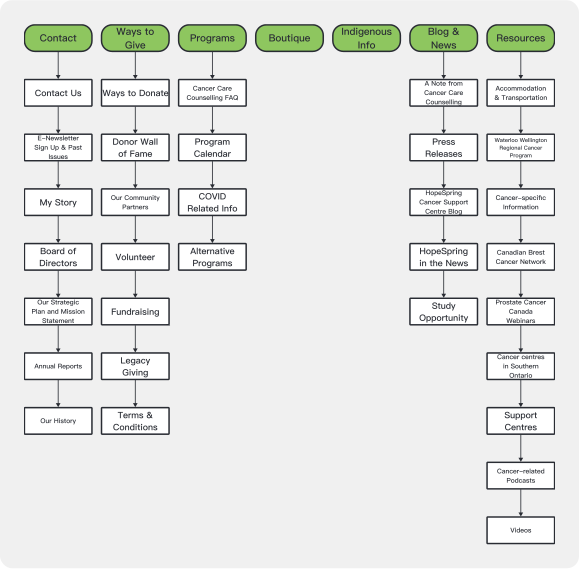
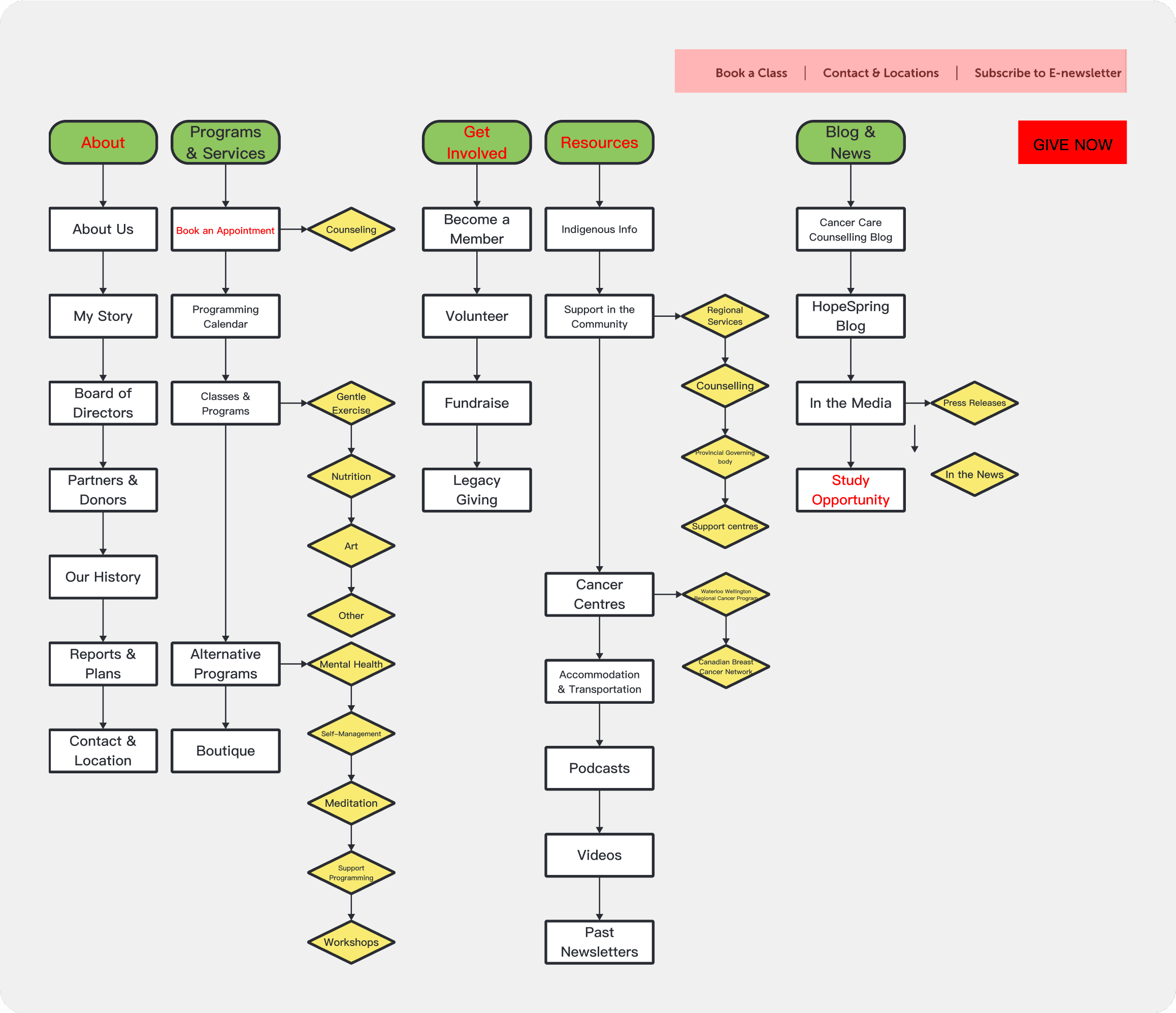
The original navigation was a maze of long menus and vague labels like “Other” and “Alternative Programs.” I tackled this in three iterations, guided by continuous feedback:
The original navigation was a maze of long menus and vague labels like “Other” and “Alternative Programs.” I tackled this in three iterations, guided by continuous feedback:
Initial Iteration
Initial Iteration
Users struggled to locate desired information or resources
Relevant content was obscured by irrelevant labels
The menu structure lacked clarity
Users struggled to locate desired information or resources
Relevant content was obscured by irrelevant labels
The menu structure lacked clarity
Iteration #1
Iteration #1
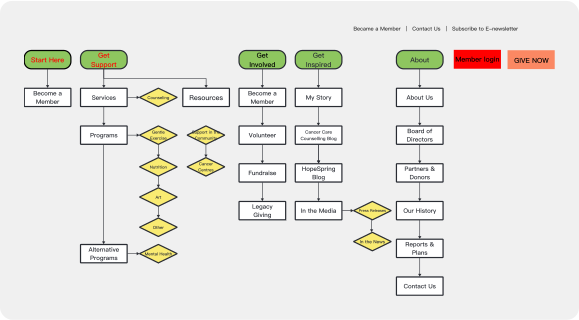
Menu labels were made clearer
The number of menu items was condensed
A prominent call-to-action was added for immediate access to the donation page
Menu labels were made clearer
The number of menu items was condensed
A prominent call-to-action was added for immediate access to the donation page
Iteration #2
Iteration #2
Added a start here menu item
Condensed Get support
Added member login button
Added a start here menu item
Condensed Get support
Added member login button
Iteration #3
Iteration #3
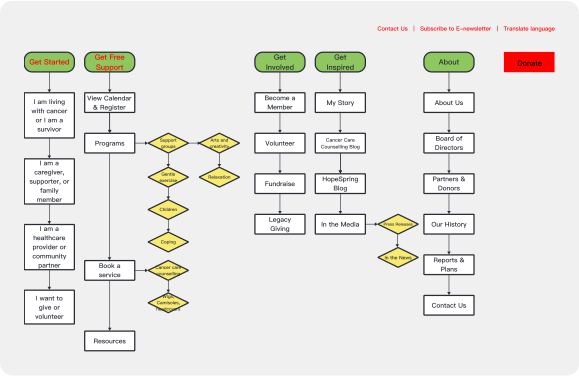
Get started was optimized to target user groups
“I am living with cancer”
“I am a caregiver/supporter”
“I am a healthcare provider”
“I want to give or volunteer”
Clearer labelling
Secondary navigation included accessibility
Get started was optimized to target user groups
“I am living with cancer”
“I am a caregiver/supporter”
“I am a healthcare provider”
“I want to give or volunteer”
Clearer labelling
Secondary navigation included accessibility
Results
Results
The experience was leaner and less overwhelming.
The experience was leaner and less overwhelming.
58 → 33
Reduced pages
Reduced pages
8 → 5
Reduced menu items
Reduced menu items
Before vs after


Process
Design Improvements That Mattered Most
Design Improvements That Mattered Most
The redesign wasn’t about isolated fixes, it was about weaving accessibility, clarity, and empathy together into a cohesive experience.
The redesign wasn’t about isolated fixes, it was about weaving accessibility, clarity, and empathy together into a cohesive experience.
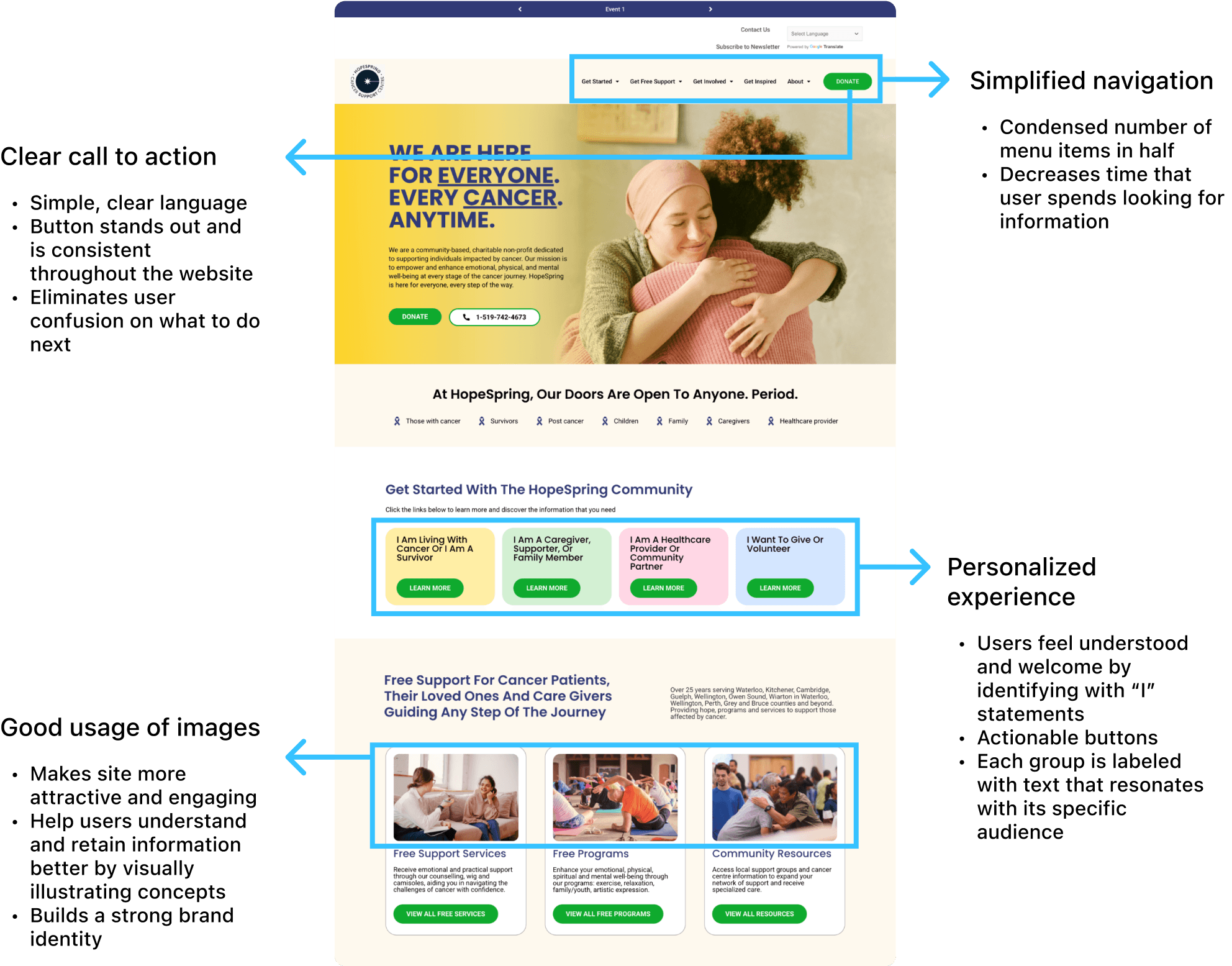
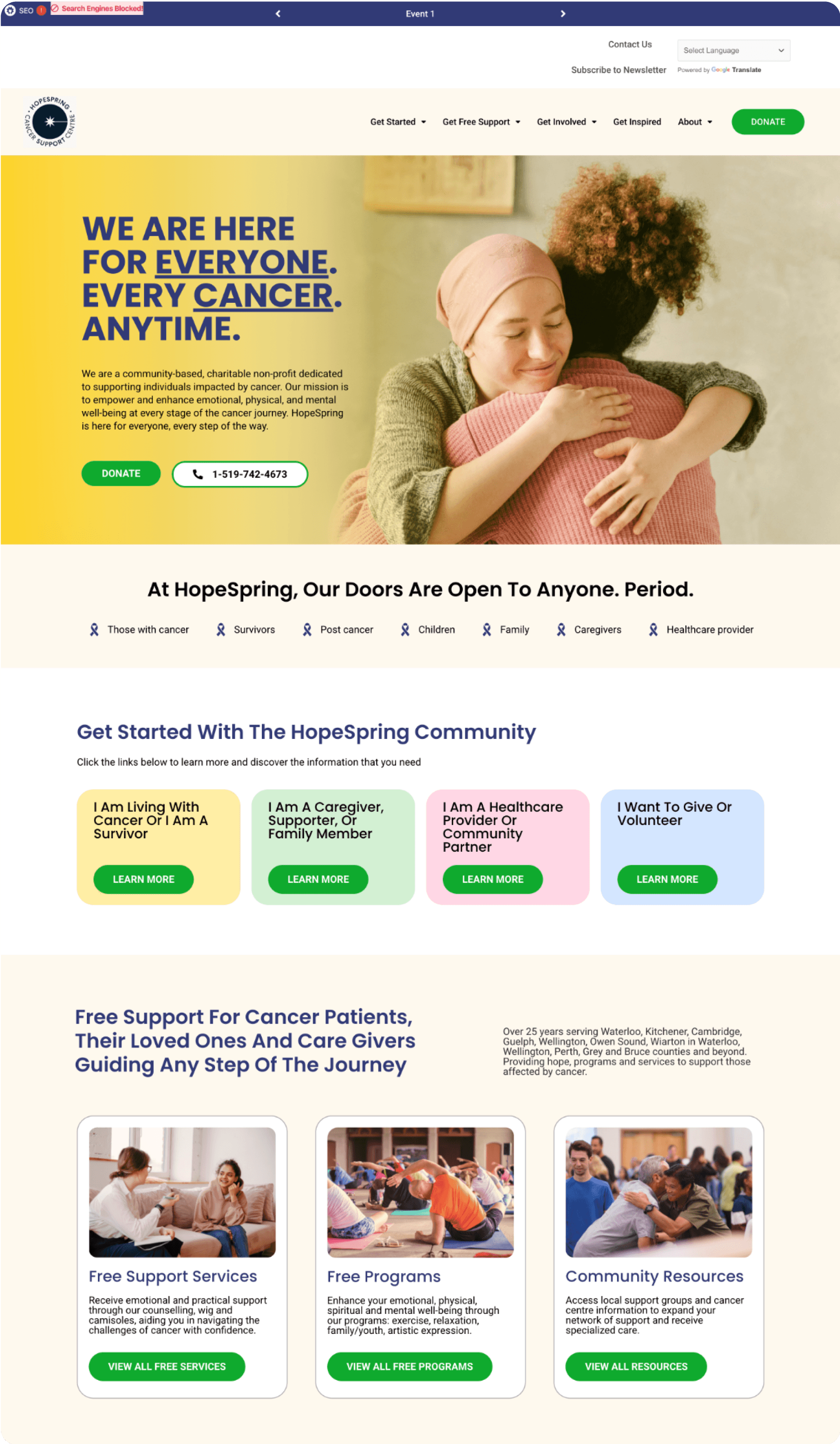
Simplified navigation
Condensed number of menu items in half
Decreases time that user spends looking for information
Clear call to action
Simple, clear language
Button stands out and is consistent throughout the website
Eliminates user confusion on what to do next
Personalized experience
Users feel understood and welcome by identifying with “I” statements
Actionable buttons
Each group is labeled with text that resonates with its specific audience
Good usage of images
Makes site more attractive and engaging
Help users understand and retain information better by visually illustrating concepts
Builds a strong brand identity
Stakeholders described the new site as “simple, supportive, and human.”
Stakeholders described the new site as “simple, supportive, and human.”
UI design
Design system & style guide
Design system & style guide
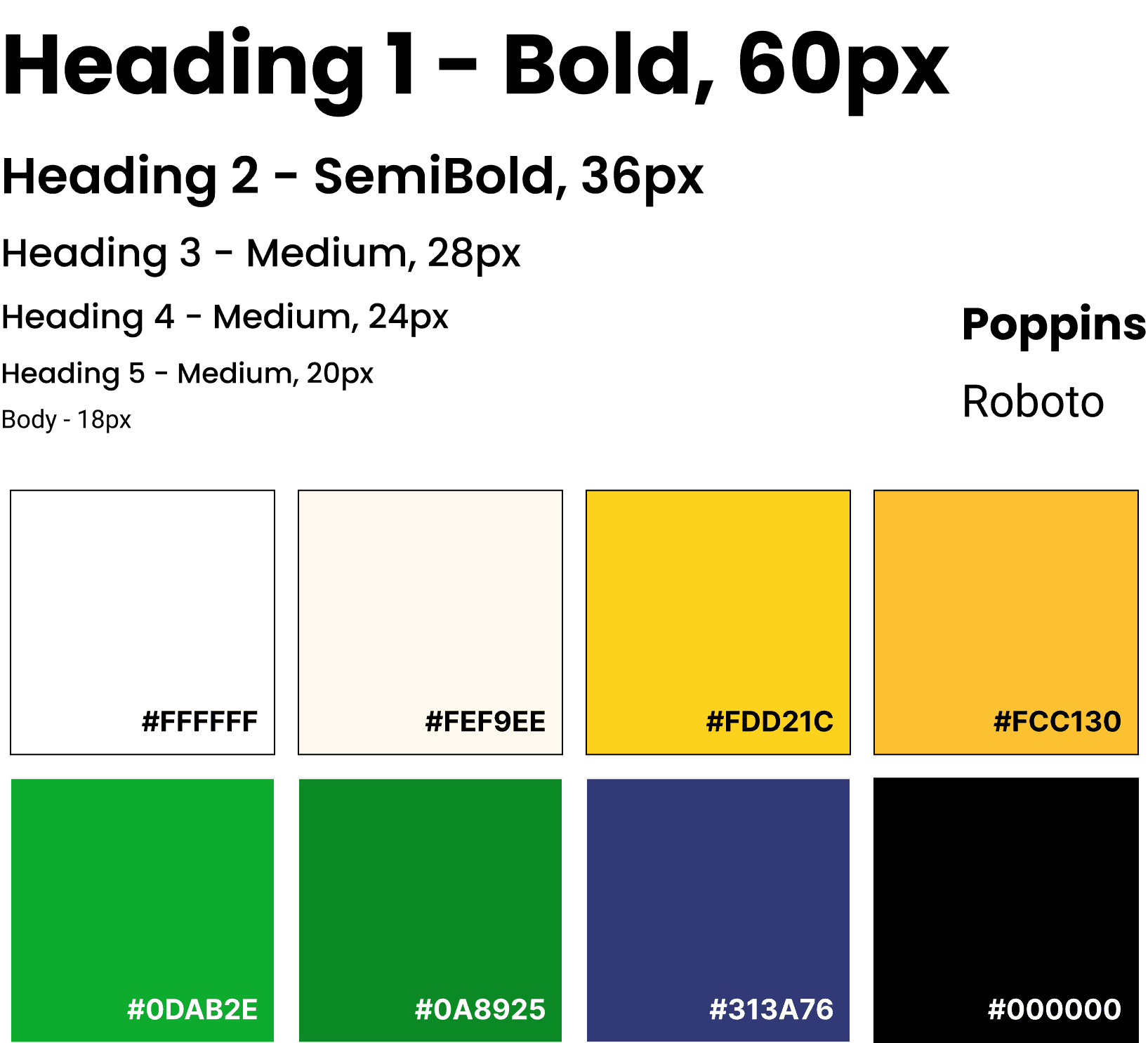
Poppins
Roboto
Heading 1 - Bold, 60px
Heading 2 - SemiBold, 36px
Heading 3 - Medium, 28px
Heading 4 - Medium, 24px
Heading 5 - Medium, 20px
Body - 18px
#FFFFFF
#FEF9EE
#FDD21C
#FCC130
#0DAB2E
#0A8925
#313A76
#000000
Reflection
If I had more time...
If I had more time...
Deeper Usability Testing
Deeper Usability Testing
I would run multiple rounds of moderated testing with each user group to validate not only navigation but also emotional tone and content clarity.
I would run multiple rounds of moderated testing with each user group to validate not only navigation but also emotional tone and content clarity.
Long-term Analytics Setup
Long-term Analytics Setup
With baseline metrics missing at the start, I’d establish tracking tools (Google Analytics, Hotjar) to measure engagement, drop-off rates, and donation conversions over time.
With baseline metrics missing at the start, I’d establish tracking tools (Google Analytics, Hotjar) to measure engagement, drop-off rates, and donation conversions over time.
What did I learn?
What did I learn?
Constraints Drive Creativity
Constraints Drive Creativity
Working as the only designer with no prior data forced me to rely on qualitative research and iteration. It taught me to make confident design decisions even in ambiguity.
Working as the only designer with no prior data forced me to rely on qualitative research and iteration. It taught me to make confident design decisions even in ambiguity.
Navigation is About Empathy
Navigation is About Empathy
Menus aren’t just links, they’re pathways through stress. Designing with survivors experiencing “cancer brain fog” reminded me that clarity is a form of care.
Menus aren’t just links, they’re pathways through stress. Designing with survivors experiencing “cancer brain fog” reminded me that clarity is a form of care.
Small Changes, Big Impact
Small Changes, Big Impact
Simple shifts like fewer menu items or a consistent donate button dramatically improved usability and stakeholder confidence. Sometimes the most effective solutions are the least flashy.
Simple shifts like fewer menu items or a consistent donate button dramatically improved usability and stakeholder confidence. Sometimes the most effective solutions are the least flashy.
nancyzheng.
Made with a stash of Sour Patch Kids and an over heating laptop
Made with a stash of Sour Patch Kids and an over heating laptop
@2025 Portfolio by Nancy Zheng
@2025 Portfolio by Nancy Zheng